Client portal software for recruiters
Denby is a portal for recruitment agencies with two kinds of client: hiring companies and candidates. Hiring managers receive shortlists and agree terms in one place; candidates upload their CV, ID and right-to-work documents against a checklist, with automatic reminders, so placements aren't held up by paperwork.
What recruiters use Denby for
Candidate compliance
Send each candidate a checklist: passport or ID, proof of address, right-to-work evidence, qualifications and references. Reminders go out until it's complete, and nothing sits in a consultant's inbox.
Shortlists for hiring managers
Share anonymised or full CVs with the hiring manager in their portal, with your notes in the thread, instead of attachments forwarded around the client's team.
Terms of business
Put your terms up for approval when a new client briefs you. The typed-name approval, date and IP are on file before the first introduction.
Placement invoices
Invoice the placement fee on the hiring company's page, with your own payment link, next to the terms they approved.
A request recruiters send in their first week
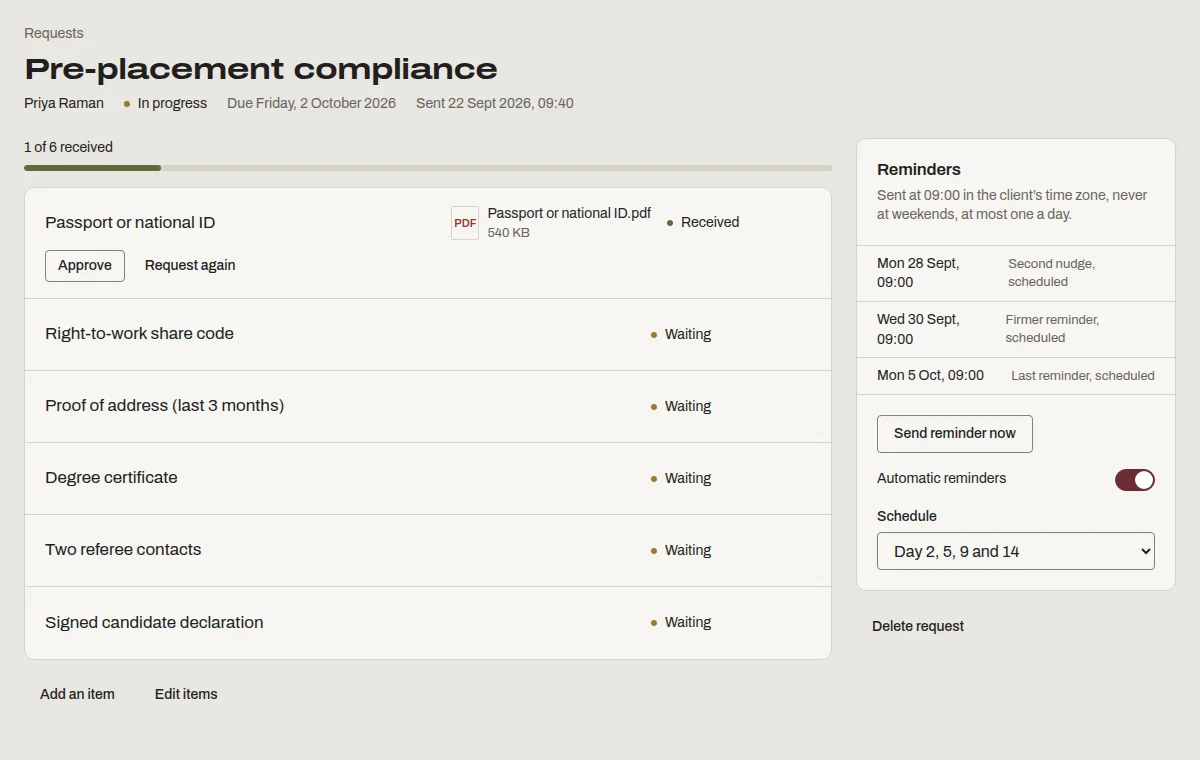
This is “Pre-placement compliance”, one of the templates Denby suggests. Send it as it is, or change the items to match how you work.
- Passport or national ID
- Right-to-work share code
- Proof of address (last 3 months)
- Degree certificate
- Two referee contacts
- Signed candidate declaration
What recruiters ask before switching
- We already have an ATS.
- Your ATS runs the pipeline. Denby handles the document collection and client-facing side it does badly: chasing candidates for paperwork and sharing shortlists without email attachments.
- Candidates won't make an account.
- They don't need to. They click a link in the email and upload from their phone. No password, no app.
- Compliance documents are sensitive.
- Each candidate sees only their own page. Files are encrypted, scanned and every download is logged with who and when.
Questions people ask
Do candidates count as clients on my plan?
Yes. Each candidate you create a page for counts as an active client while they're active. Archive candidates once they're placed or withdrawn: their files stay on record, and they stop counting toward your plan's limit straight away.
Can a hiring manager see other candidates' documents?
No. Every page is separate. A hiring manager sees only what you share on their company's page, such as shortlist CVs; candidate ID and right-to-work documents stay on each candidate's own page, visible only to them and your team.
Can I delete candidate data when I no longer need it?
Yes. Delete the candidate's page and their files move to a deleted list for 30 days, then are permanently removed. That makes it straightforward to follow your own retention policy for candidate records.