Client portal software for designers
Denby is a client portal for freelance designers and small studios. Each client gets one page where they send the brief and brand assets, see concepts round by round, approve the final artwork in writing and pay deposits and balances, so projects don't stall waiting for a logo file or a yes.
What designers use Denby for
The brief and the assets
Ask for the brief, existing logos, fonts, photography and examples they like in one request. Clients upload what they have, and the reminders handle the rest.
Concept rounds
Post each round to the client's thread with the files. Feedback stays attached to the round it's about, so round three doesn't reopen round one.
Final sign-off
Put the final artwork up for approval before it goes to print or launch. A typed name and a certificate beat 'looks good' in a text message.
Deposits and balances
Send the deposit invoice at kickoff and the balance at sign-off, each with your own payment link, beside the work they pay for.
A request designers send in their first week
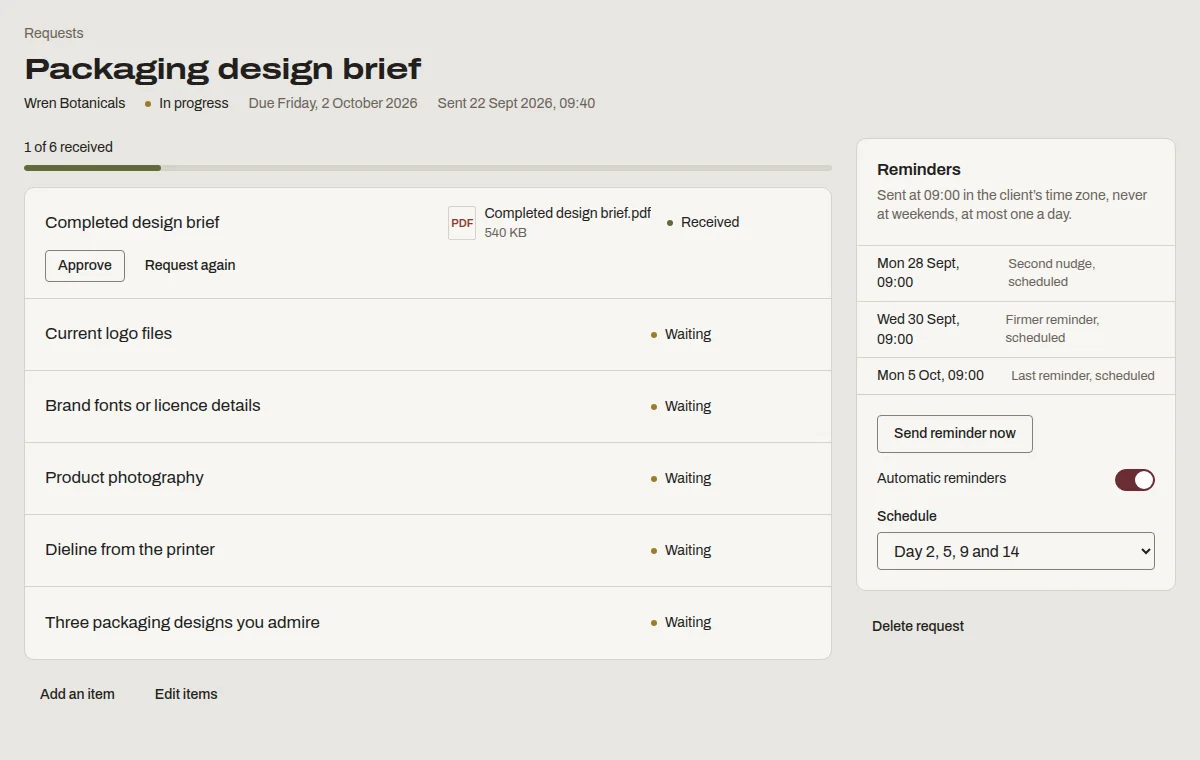
This is “Packaging design brief”, one of the templates Denby suggests. Send it as it is, or change the items to match how you work.
- Completed design brief
- Current logo files
- Brand fonts or licence details
- Product photography
- Dieline from the printer
- Three packaging designs you admire
What designers ask before switching
- I'm a one-person studio.
- Solo is $19 a month for five active clients, and archived clients don't count. Most freelancers have fewer than five live projects at once.
- Clients give feedback wherever they like.
- They will, at first. When every round lives on one page with a clear 'approve' button, most clients start using it because it's easier.
- Big final files are awkward to send.
- Upload files straight to the client's page, up to 1 GB each on Studio and 2 GB on Firm. No separate transfer service, and the download is logged.
Questions people ask
Can clients comment directly on a design?
Not on the image itself. Clients reply in the thread under the round you posted, and can attach a marked-up screenshot. Keeping feedback in one conversation per round means every comment is in order and nothing gets lost across tools.
What should I use approvals for?
Anything you'll want proof of later: the scope and fee, the chosen concept direction and the final artwork before print. Each approval records the exact files and text agreed, the approver's typed name, the time and their device, in a PDF certificate.
Can I show the portal as my own studio?
Yes. Your logo and colour are on every plan, and clients see your mark in their browser tab. From Studio you can use your own domain, so the portal reads as part of your studio rather than as a separate tool.