Client portal software for architects
Denby is a client portal for architecture practices. Each project gets one page where the client provides surveys, deeds and site photos, receives drawing sets and revisions, signs off each design stage and raises questions, so the record of who approved which drawing is never buried in someone's inbox.
What architects use Denby for
Collecting the site information
At appointment, ask for the measured survey, title plan, planning history, party wall details and photos of the existing building. The client photographs what they have and uploads it from site.
Issuing drawing sets
Upload each issue of a drawing set with its revision. Clients always see the current issue; earlier revisions stay available to your team.
Stage sign-off
Put concept, developed design and technical design up for approval at the end of each stage. The typed-name certificate records exactly which drawings were agreed.
RFIs and client decisions
Keep requests for information and the client's answers in the project thread, next to the drawings they refer to, instead of in a contractor's email chain.
A request architects send in their first week
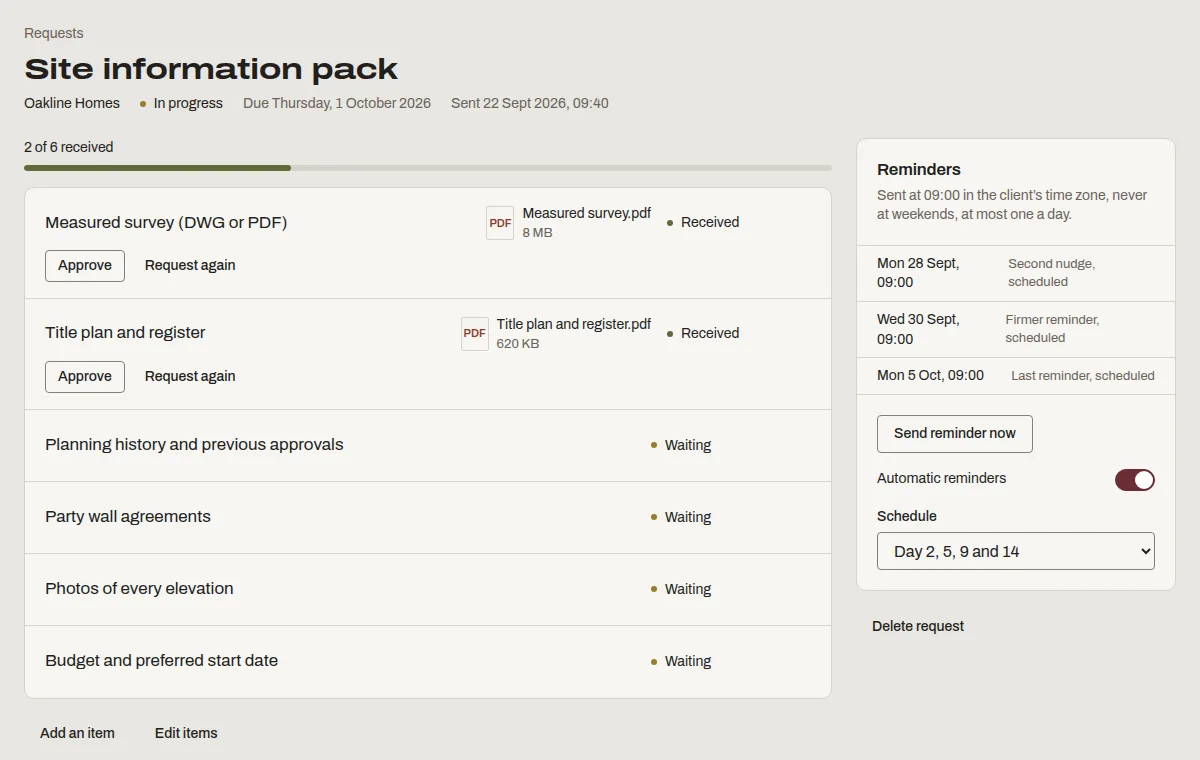
This is “Site information pack”, one of the templates Denby suggests. Send it as it is, or change the items to match how you work.
- Measured survey (DWG or PDF)
- Title plan and register
- Planning history and previous approvals
- Party wall agreements
- Photos of every elevation
- Budget and preferred start date
What architects ask before switching
- Drawings are huge.
- Files up to 2 GB on the Firm plan (1 GB on Studio) upload straight from the browser, in parts, so a big PDF set or model export doesn't need a separate transfer service.
- We already use a CDE for the design team.
- Keep it for consultants and contractors. Denby is the client-facing side: the homeowner or developer doesn't need to learn a common data environment to approve a stage.
- Clients forget what they approved.
- Every approval stores the exact content and attachment with a fingerprint, the approver's typed name, time and device. That's the record you point to.
Questions people ask
Can the client see every revision of a drawing?
By default the client sees the latest version of each file, and your team can open any earlier version. If you want the client to compare revisions, upload each revision under a distinct name, such as 'GA plans rev C', and both stay visible.
Can we use it for more than one project with the same client?
Yes. A developer client can have separate message threads per project, and you can organise their files into folders by project. Document requests and approvals are titled per project, so each one stays clearly attached to the right scheme.
Is it secure enough for title documents and ID?
Files are encrypted in transit and at rest, scanned before download and served through links that expire after five minutes. Every view and download is logged. We aren't SOC 2 certified, and we say so.