Client portal software for bookkeepers
Denby is an accounting client portal for bookkeepers and small accountancy practices. Each client gets one secure page where they upload bank statements, receipts and payroll reports against a monthly checklist, with automatic reminders, and you deliver management accounts and year-end packs in the same place, all under your practice's name.
What bookkeepers use Denby for
Month-end records
Send the same request every month: bank and card statements, sales invoices, supplier bills and payroll. Clients tick through the list; reminders chase what's missing.
Receipts from the phone
Clients photograph receipts and upload them straight onto the right item from their phone, instead of emailing a shoebox of images.
Year-end and tax
Collect the year-end pack: asset purchases, loan statements, director's expenses and stock count. Deliver the draft accounts for approval before filing.
Engagement letters
Put engagement letters and changes of scope up for approval, so every client's terms are signed and on file.
A request bookkeepers send in their first week
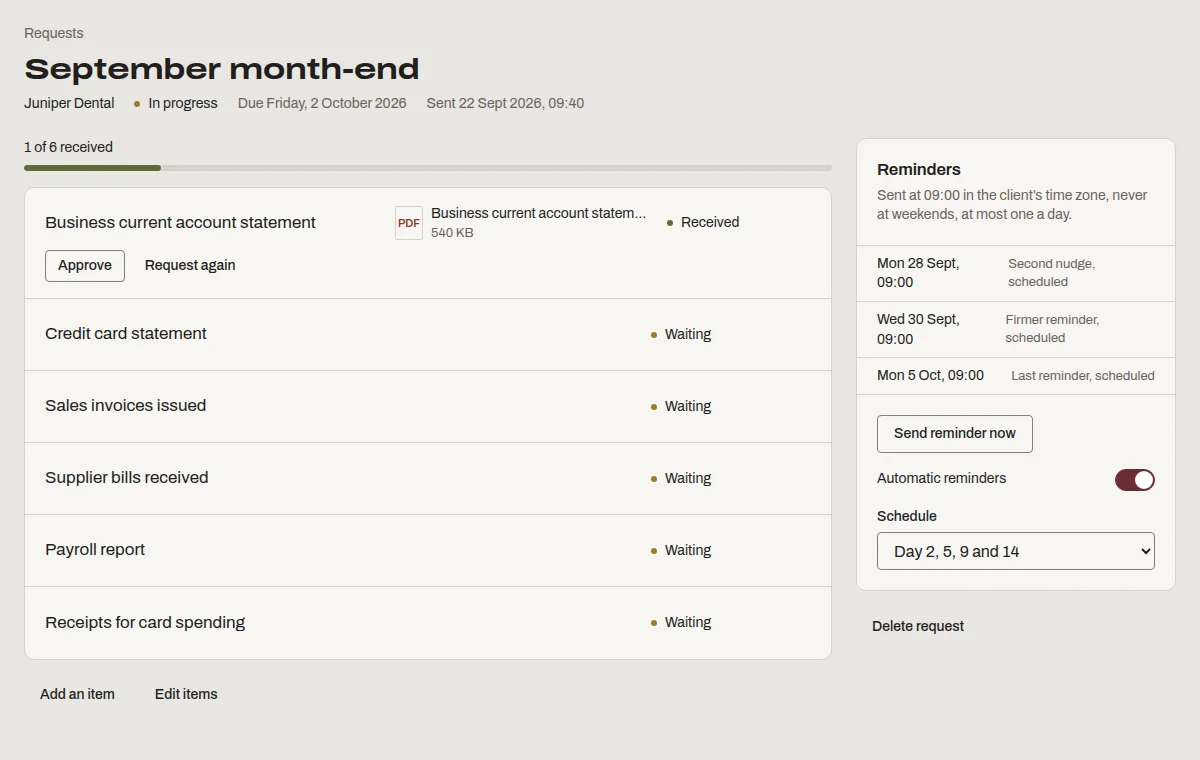
This is “September month-end”, one of the templates Denby suggests. Send it as it is, or change the items to match how you work.
- Business current account statement
- Credit card statement
- Sales invoices issued
- Supplier bills received
- Payroll report
- Receipts for card spending
What bookkeepers ask before switching
- My accounting software has a client portal.
- Some do, built around the ledger. Denby is built around getting the paperwork in: checklists, reminders and a page clients actually open.
- Clients are not technical.
- They get an email with one button, see a list of what's needed and upload. No app, no password.
- Client financial data needs to be secure.
- Files are encrypted, scanned before download, served by short-lived links, and every access is logged.
Questions people ask
Can I send the same request every month?
Yes. Save your month-end list as a template, then send it to each client in a few clicks each month with a new due date. Reminders run on the usual schedule, and each month's request stays on record separately.
Does Denby connect to Xero or QuickBooks?
Not directly. Denby collects documents and delivers work; your accounting software keeps the books. Download a client's files as a zip when you need to process them. We've kept Denby separate so it works whichever ledger software each client uses.
Can clients see each other's documents?
No. Each client's contacts see only their own page. Separation is enforced in the database, not just in the screens, and our automated tests check that one client can never read another's files.